

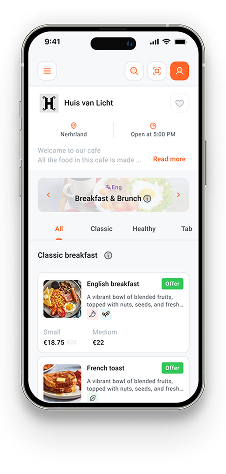
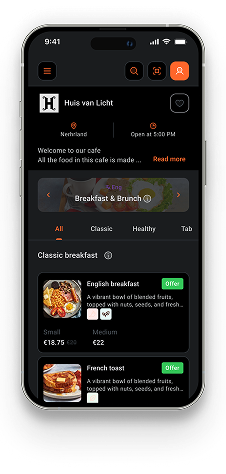
Getting your business onto DENU takes about 10 minutes. Here's exactly what to do, from signing up to having your QR code live and in customers' hands.
Step 1: Create Your Account
Head to app.denu.dev and sign up. DENU uses phone number verification, no password to forget, no email confirmation loop. Enter your number, receive a 6-digit code, and you're in. Your first business location is completely free. No credit card required, no time limit.
Step 2: Set Up Your Business Profile
Fill in your business name, type, address, and a short description. DENU supports over 21 business types: restaurant, café, spa, retail store, food truck, hotel, and many more. Add a logo if you have one. This is what customers see when they discover you on DENU's explore page.
Step 3: Create Your First Menu
From your dashboard, create a new menu and give it a name like "Main Menu", "Summer 2025", or "Drinks Menu". You can create multiple menus per location: useful for different languages, dining areas, or seasonal offerings.
Step 4: Add Categories and Items
Organise your menu with categories that match your business (Starters, Mains, Desserts, Drinks, or Products, Services, Packages for non-food businesses). Then add items to each category:
- Name and description: clear, descriptive, honest
- Price and currency: supports any currency
- High-quality photo: even a good smartphone shot works
- Dietary labels: Vegetarian, Spicy, Gluten-Free, Popular, New, and more
DENU suggests category names based on your business type, so you're not starting from a blank page.
Step 5: Publish and Get Your QR Code
Once your menu goes through a brief admin review (usually within a few hours), head to the QR Codes section of your dashboard. Generate a QR code for your location. You can customise its style to match your brand. Download it, print it, and place it wherever customers will see it: tables, entrance, packaging, receipts.
That's It
Customers scan the QR code, open your catalog instantly in their browser with no app download needed, and can browse everything you offer. You can update your menu at any time from the DENU dashboard, and changes go live immediately after review.
Your first location is free. There's no reason not to start today.